So, this happened a whole lot sooner than I thought it would, but my newly designed website is up! Thanks to the flash man, Ryan Harlow for making it functional. Now it's a pretty easy task to actually update it, since I designed it to have stuff added to it. This is the opposite of how my old, crappy site was. And to that old piece of crust, I say good riddance. And as you can tell by looking at it, this very blog is linked to it. Well, not much to say, just that the new site is up. Check it out at:
www.3dryan.com

Saturday, February 6, 2010

Thursday, February 4, 2010
The Desert Sessions, PT.1
Alright. so the desert is coming along nicely. I've even come up with an official name. Henceforth, it will be known as "Desert Straggler". I think it has a nice ring to it. Anyway, I've got some 3D sketching pics to show. Now obviously, it's extremely simplified. This version is made with the sole purpose to give Joe an idea of where things are within the level. Observe:


 Okay, so what you're looking at is a cliifside that overlooks the ocean. Obviously, the blue is ocean, orange is cliffside, gray is ground, orange sticks are trees, the metallic looking square is a small shanty, the small cylinder in front of that is a fireplace, the red thing is a crashed plane, the large orange block next to the shack is a rock formation, and the block that looks like sand is a rocky beach area. Confused? I hope not. If not, here's the general concept of the area. Two men were flying their small plane above the coast of southern Australia when they lost control and crashed right near a cliff that overlooks the ocean. The crash was fatal for one guy, but the other survived and now lives alone, stranded and surrounded by nothing but desert and ocean. He has constructed a shanty for himself from sheet metal, as well as a small bonfire area, a grave site for his friend, and two tall light stands to help illuminate his habitat. You can see the crash site as well, which tells you that he didn't venture too far away from it. Now obviously, there are many plot holes in this story, and as to how he collected all this stuff, but I don't care. If I held back and made this totally realistic, it would be boring. He just so happens to have this stuff. Deal with it.
Before I even had a theme to go by, I knew a couple things that I wanted out of this project.
1) It had to be open ended, like if you took a chunk out of the map in Fallout 3. You can look around in all directions.
2) It had to be outdoors, so that I can show my skills in making exterior, organic environments.
3) I had to have something that would really let me sculpt some terrain, so I could show that I'm familiar with that tool set within Unreal.
4) It had to have a skybox.
5) It had to have some sort of water, whether it be a river, ocean, or lake.
6) It had to be more ambitious as far as scope goes. It'll take me until May at least. Trust me.
7) It had to take place during sunset. It's something you don't see as much as daylight scenes in games. Also, it'll be more fun and challenging to light as well as just looking prettier in general.
I this project fits all aspects very well.
Landmarks:
Shanty campsite- The metallic shanty mentioned earlier with a campfire in front of it. It sits right between the edge of the cliff and the wooded area. It contains many personal belongings, like a toothbrush, clothes, pictures, etc. Good little details that will tell a story. Situated between the campfire and rock formation are fixed up floodlights that he has duct taped and custom rigged together to stand properly.
Grave site- Not sure where it'll be yet. This can be pretty flexible. It will be a small dirt pile in the ground that has a small, crudely made wooden cross sticking in it. Simple.
Airplane crash- The prop that tells us how the player got here. It's a small plane that can only accompany two people. It'll have the front end all crunched up, with a good amount of grit on it. You know, it'll look like a crashed plane. For some reason, it keeps coming up as red and blue in my head.
Open space- Wide open area behind the crashed plane. It's almost completely flat, and you can see pretty far away. Minimal trees, but plenty of smaller vegetation. Gives you the biggest impression that it's a desert.
Cliff side rocks and beach- Next to the shanty is a bunch of rock formations that eventually lead to a half sand, half stone beach. If you are looking at the ocean, on the right opposite side of the cliff, there is no beach sand, but just steep cliffs.
Small wooded area- Located where the bulk of the trees are. It breaks the environment up a bit. Makes the composition of the environment better.
This all may sound kind of confusing, but after me, Joe, and Jake have our talks, it'll make sense like it currently does in my head. Haha.
And for a better idea of reference, here's my Photobucket page with pics of inspiration:
http://s573.photobucket.com/home/3DRyan
Now, it's on to learning more Speedtree and waiting for sketches. Huzzah!


 Okay, so what you're looking at is a cliifside that overlooks the ocean. Obviously, the blue is ocean, orange is cliffside, gray is ground, orange sticks are trees, the metallic looking square is a small shanty, the small cylinder in front of that is a fireplace, the red thing is a crashed plane, the large orange block next to the shack is a rock formation, and the block that looks like sand is a rocky beach area. Confused? I hope not. If not, here's the general concept of the area. Two men were flying their small plane above the coast of southern Australia when they lost control and crashed right near a cliff that overlooks the ocean. The crash was fatal for one guy, but the other survived and now lives alone, stranded and surrounded by nothing but desert and ocean. He has constructed a shanty for himself from sheet metal, as well as a small bonfire area, a grave site for his friend, and two tall light stands to help illuminate his habitat. You can see the crash site as well, which tells you that he didn't venture too far away from it. Now obviously, there are many plot holes in this story, and as to how he collected all this stuff, but I don't care. If I held back and made this totally realistic, it would be boring. He just so happens to have this stuff. Deal with it.
Before I even had a theme to go by, I knew a couple things that I wanted out of this project.
1) It had to be open ended, like if you took a chunk out of the map in Fallout 3. You can look around in all directions.
2) It had to be outdoors, so that I can show my skills in making exterior, organic environments.
3) I had to have something that would really let me sculpt some terrain, so I could show that I'm familiar with that tool set within Unreal.
4) It had to have a skybox.
5) It had to have some sort of water, whether it be a river, ocean, or lake.
6) It had to be more ambitious as far as scope goes. It'll take me until May at least. Trust me.
7) It had to take place during sunset. It's something you don't see as much as daylight scenes in games. Also, it'll be more fun and challenging to light as well as just looking prettier in general.
I this project fits all aspects very well.
Landmarks:
Shanty campsite- The metallic shanty mentioned earlier with a campfire in front of it. It sits right between the edge of the cliff and the wooded area. It contains many personal belongings, like a toothbrush, clothes, pictures, etc. Good little details that will tell a story. Situated between the campfire and rock formation are fixed up floodlights that he has duct taped and custom rigged together to stand properly.
Grave site- Not sure where it'll be yet. This can be pretty flexible. It will be a small dirt pile in the ground that has a small, crudely made wooden cross sticking in it. Simple.
Airplane crash- The prop that tells us how the player got here. It's a small plane that can only accompany two people. It'll have the front end all crunched up, with a good amount of grit on it. You know, it'll look like a crashed plane. For some reason, it keeps coming up as red and blue in my head.
Open space- Wide open area behind the crashed plane. It's almost completely flat, and you can see pretty far away. Minimal trees, but plenty of smaller vegetation. Gives you the biggest impression that it's a desert.
Cliff side rocks and beach- Next to the shanty is a bunch of rock formations that eventually lead to a half sand, half stone beach. If you are looking at the ocean, on the right opposite side of the cliff, there is no beach sand, but just steep cliffs.
Small wooded area- Located where the bulk of the trees are. It breaks the environment up a bit. Makes the composition of the environment better.
This all may sound kind of confusing, but after me, Joe, and Jake have our talks, it'll make sense like it currently does in my head. Haha.
And for a better idea of reference, here's my Photobucket page with pics of inspiration:
http://s573.photobucket.com/home/3DRyan
Now, it's on to learning more Speedtree and waiting for sketches. Huzzah!
Wednesday, February 3, 2010
Post Game Jam, Website, 3D Sketching, Speedtree, etc.
So, I got back from the Game Jam this past Monday, and I must say I had a blast. First, I went up to visit my friend Joe in Rochester. We hung out for a couple days, and then we both went to Chicago for a couple more. The main reason for this trip was of course, for the game jam. Let me first say this to anyone who read my little story on last year's jam. It was INFINITELY better this year. For those of you who didn't read said story, I got insanely sick during last year's trip. So needless to say, it was pretty hard to do worse this time around. However, in keeping with last year's tradition, my team biffed up pretty bad. Our designers and programmers were unable to get certain elements working properly, which made it so that I couldn't make pretty art for all to see. No hard feelings though, as it was a fault of technology and no person in particular. It didn't really bother me, as I got what I really wanted out of the trip. Meeting cool people, networking, and generally being around like-minded folks that do the same thing I do. Nothing is better. Having my best friend along for the journey definitely doesn't hurt either. So all in all, it was a great trip.
Now, onto future business.
The website: Will be up soon. I just gave Ryan Harlow, my friend that knows flash a hell of a lot better than I do, the needed files. So in a couple weeks, it'll be up. Now obviously, it's only the work that I've done thus far and does not include the demo reel or pics of the desert environment, which I have yet to do.
Speaking of which, that is coming along pretty well. Jake just gave me the map file that lays out the level roughly, and I'm going to edit some stuff to my will. Then I'll hand it off to Joe to draw from. I'll post some pics of the level as soon as it's done, which will be in a few days.
Lastly, Speedtree! It's amazing. It's basically a 3D app that lets you very quickly generate realistic looking trees, grass, and rocks, among many other things. I'm learning it right now, and it basically cuts my workflow right in half. Very intuitive, easy to learn, and it makes my life so much easier. So yeah. I'll post again soon.
Now, onto future business.
The website: Will be up soon. I just gave Ryan Harlow, my friend that knows flash a hell of a lot better than I do, the needed files. So in a couple weeks, it'll be up. Now obviously, it's only the work that I've done thus far and does not include the demo reel or pics of the desert environment, which I have yet to do.
Speaking of which, that is coming along pretty well. Jake just gave me the map file that lays out the level roughly, and I'm going to edit some stuff to my will. Then I'll hand it off to Joe to draw from. I'll post some pics of the level as soon as it's done, which will be in a few days.
Lastly, Speedtree! It's amazing. It's basically a 3D app that lets you very quickly generate realistic looking trees, grass, and rocks, among many other things. I'm learning it right now, and it basically cuts my workflow right in half. Very intuitive, easy to learn, and it makes my life so much easier. So yeah. I'll post again soon.
Sunday, January 17, 2010
New Website in the Works
So, for my next order of business, I decided to start revamping my website. Right now, it's about to have it's second birthday. Two years. Crazy to think that it's been almost two years since I graduated. So anyway, it's been collecting cobwebs and definitely needs some sweeping, so here's some pics of the re-design:


 It's surprising how creepy it feels to see my face in the first pic. Haha. So, as you can see, simplicity is the word of the day. Not simple as in crappy-looking simple, but simple as in not having all kinds of fancy motion with five million colors all over the place. I hate going to websites and having them take twenty seconds to load some ridiculous flash animation, just to get to the next page. Since this is meant mainly for future employers to look at, I want it to be extremely easy for them to navigate and find what they want. Also, I think that having your contact info at the top of each page makes their job easier as well. They don't have to hunt down the right page just to contact you if they like what they see. This is by no means done, as I still need some backing from friends that it's looking good, which is partially why I posted this in the first place.
In other news, Jake and I had our conceptual talk over the desert environment. We now know the basic layout and premise of the project, and over the next few weeks, a 3D sketch and some 2D sketches will be posted periodically. Jake will do the 3D sketch in Hammer (Valve's level editor), and then we'll pass it off to Joe to sketch from. Once again, it all depends on how everyone's schedules go over the next few weeks.
Finally, the Global Game Jam is coming up next week. I'm taking a week off to visit Joe in Rochester, and then we're going to Chicago. I'm participating in the Jam of course, and he's gonna work on a tasty script. I'll definitely have some pics to post on my facebook. Stay tuned for that.


 It's surprising how creepy it feels to see my face in the first pic. Haha. So, as you can see, simplicity is the word of the day. Not simple as in crappy-looking simple, but simple as in not having all kinds of fancy motion with five million colors all over the place. I hate going to websites and having them take twenty seconds to load some ridiculous flash animation, just to get to the next page. Since this is meant mainly for future employers to look at, I want it to be extremely easy for them to navigate and find what they want. Also, I think that having your contact info at the top of each page makes their job easier as well. They don't have to hunt down the right page just to contact you if they like what they see. This is by no means done, as I still need some backing from friends that it's looking good, which is partially why I posted this in the first place.
In other news, Jake and I had our conceptual talk over the desert environment. We now know the basic layout and premise of the project, and over the next few weeks, a 3D sketch and some 2D sketches will be posted periodically. Jake will do the 3D sketch in Hammer (Valve's level editor), and then we'll pass it off to Joe to sketch from. Once again, it all depends on how everyone's schedules go over the next few weeks.
Finally, the Global Game Jam is coming up next week. I'm taking a week off to visit Joe in Rochester, and then we're going to Chicago. I'm participating in the Jam of course, and he's gonna work on a tasty script. I'll definitely have some pics to post on my facebook. Stay tuned for that.
Tuesday, January 12, 2010
Another milestone done, another day.
There's not really a lot visually to show this update, but it IS a big step in the right direction. As I said in earlier posts, I've had some time to kill while waiting for the desert project to get rolling, so I finished the Chernobyl and laser rifle projects. Now, I've finished making decisions on how to present each project in the demo reel, as well as determining camera movement and capturing video. So in a nutshell, I have all my raw footage and stills, and I'm ready to import them into a nonlinear editing package to finish for good. I'm still a little on the fence about this, but I think I want to wait until the desert is done to actually start editing. Reworking the website is also something that I've been thinking about getting back into. I think that both things go hand in hand though, as I want them to have a similar look and feel. In any case, here's a breakdown of the shots for the reel thus far:
Chernobyl
1) Fade in as camera pans out to show a full view of the scene.
2) Still image of wireframe view
3) Still image of color map view
4) Still image of color/normal map view.
5) Still image of final view, which now includes specular map.
6) Camera pans from left of scene to right and fades out.
Laser Rifle
1) Shot of Jake's concept drawing fades in and out.
*The camera stays still in each following shot as rifle does a 360 rotation. Each shot has it rotate around once.*
2) Fade in to view final shot
3) Wireframe view
4) Color map view
5) Normal map view
6) Specular view, which is once again the final shot at this point.
What I DO have to show is the wireframe shot of Chernobyl. Since unreal editor does a crappy job of capturing stills in the viewport, I had to do some cleanup of the black lines in Photoshop.
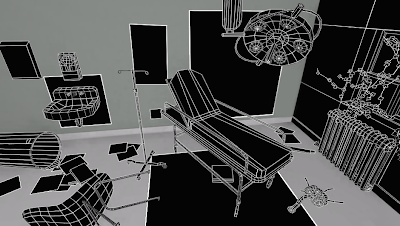 And that's all for now. In a week or two, expect to see something on the desert. I am out.
Chernobyl
1) Fade in as camera pans out to show a full view of the scene.
2) Still image of wireframe view
3) Still image of color map view
4) Still image of color/normal map view.
5) Still image of final view, which now includes specular map.
6) Camera pans from left of scene to right and fades out.
Laser Rifle
1) Shot of Jake's concept drawing fades in and out.
*The camera stays still in each following shot as rifle does a 360 rotation. Each shot has it rotate around once.*
2) Fade in to view final shot
3) Wireframe view
4) Color map view
5) Normal map view
6) Specular view, which is once again the final shot at this point.
What I DO have to show is the wireframe shot of Chernobyl. Since unreal editor does a crappy job of capturing stills in the viewport, I had to do some cleanup of the black lines in Photoshop.
 And that's all for now. In a week or two, expect to see something on the desert. I am out.
Tuesday, January 5, 2010
laser rifle final-ish final
Yeah, I know. That was quick. But nevertheless, the laser rifle is 100% complete! There wasn't near as much stuff wrong with it as Chernobyl, so it took only some minor tweaking to get it to the level I wanted. Here it be:


 List of changes:
1)- The wood stock grip was far too damaged looking. I tried to justify in my mind why it would look that way before, but this time around I decided that it needed to be revamped. The specularity plays better off of the bumps and I've also added a silver rim around it that helps it pop out a bit more.
2)- The glass encasing the blue batteries looks more glass-like now. How nice!
3)- Some subtle paint marks have been added to the wood stock. I thought it might have been lying around a woodshop and someone might have gotten some paint on it accidentally. It adds a little, visually to the wood.
4)- I made all of the lights on the trigger dimmed out completely, except for the one that the switch is on, which I made more chromatic to differ from the others. You can see it in the second pic. It's the green light.
5)- I altered the specular maps in general, as adding the new lightmass system made the lighting different. Some things are more or less specular.
6)- The most apparent of all the changes is adding the new lightmass system. It's what's responsible for probably more the 50% of the overall improvement. Bump and specularity show up better, and light reaches all around the object in a more realistic manner.
So that's another one down. The plan remains the same for now with all the other projects. I have yet to touch base with Jake on the desert project, and I plan on doing that ASAP. While I'm waiting for sketches, I'm gonna start on production for the demo reel. I must say that I'm getting excited as the global game jam gets closer, and I'll also be helping Joe with his new film. Expect something on the desert or demo reel towards the middle of the month or so. YES.


 List of changes:
1)- The wood stock grip was far too damaged looking. I tried to justify in my mind why it would look that way before, but this time around I decided that it needed to be revamped. The specularity plays better off of the bumps and I've also added a silver rim around it that helps it pop out a bit more.
2)- The glass encasing the blue batteries looks more glass-like now. How nice!
3)- Some subtle paint marks have been added to the wood stock. I thought it might have been lying around a woodshop and someone might have gotten some paint on it accidentally. It adds a little, visually to the wood.
4)- I made all of the lights on the trigger dimmed out completely, except for the one that the switch is on, which I made more chromatic to differ from the others. You can see it in the second pic. It's the green light.
5)- I altered the specular maps in general, as adding the new lightmass system made the lighting different. Some things are more or less specular.
6)- The most apparent of all the changes is adding the new lightmass system. It's what's responsible for probably more the 50% of the overall improvement. Bump and specularity show up better, and light reaches all around the object in a more realistic manner.
So that's another one down. The plan remains the same for now with all the other projects. I have yet to touch base with Jake on the desert project, and I plan on doing that ASAP. While I'm waiting for sketches, I'm gonna start on production for the demo reel. I must say that I'm getting excited as the global game jam gets closer, and I'll also be helping Joe with his new film. Expect something on the desert or demo reel towards the middle of the month or so. YES.
Saturday, January 2, 2010
Chernobyl circa 2010.
Happy new years and all that stuff. I'm starting my new year off right by saying that Chernobyl is complete! No reworks. Case closed. It's always hard for me to walk away from projects due to the fact that I'm a perfectionist when it comes to just about everything. But, there comes a time when you have to lock the gate and move on to newer things. So here it be laddies and lads:


 As you can tell, there have been even more changes. A list:
1) Four new props: paper towel dispenser, hand soap dispenser, ivy vines, and trash can. Though they're all mundane objects on their own, they help to make the level more believable. A sink without at least something to go with it just looks odd in my opinion. Not too much wear and tear on any of them. They all have normal maps but the only one done in Zbrush was the trash can. It was mainly just to keep Zbrush fresh in my mind for when I use it in the desert project later. Plus the trash bag detail and the grooves on the metal lent themselves to 3d sculpting extremely well. The vines especially make the room look older and overgrown as nature tends to retake things that haven't been kept up in awhile.
2) I desaturated some objects to give the level a more dead, abandoned feel. Some of the objects had too much chromatic pop to them, so I lowered it so they wouldn't stick out so much. The chair and wall tile are the most noticeable by far.
3) I added what is called a post process effect. It is basically a box that makes you able to make changes to stuff like color contrast, which is what I used it for. You might not be able to notice it that well, but it allows things to have more of a contrast that just looks more pleasing to the eye.
4) I darkened and desaturated the poster so that it would blend into the wall better. Stuck out like a sore thumb before.
5) Not big, but I moved the papers around on the floor to better compose the scene based on the new objects I added.
That's it! I will probably never be fully satisfied with it, but compared to how it looked before, I must say It looks pretty good for my first time using Unreal.
So, new things in the mix! I'm still waiting it out for Jake to get me some sketches of the desert, so I'm going to make one more run at the laser rifle and correct some minor issues. I hope to get the ball rolling on more detailed sketches by mid January, but I have a huge amount of things that I can do while I wait, like post production for the demo reel and reworking the website. The gun shouldn't take long to finish, so look for that soon.
Ryan out.


 As you can tell, there have been even more changes. A list:
1) Four new props: paper towel dispenser, hand soap dispenser, ivy vines, and trash can. Though they're all mundane objects on their own, they help to make the level more believable. A sink without at least something to go with it just looks odd in my opinion. Not too much wear and tear on any of them. They all have normal maps but the only one done in Zbrush was the trash can. It was mainly just to keep Zbrush fresh in my mind for when I use it in the desert project later. Plus the trash bag detail and the grooves on the metal lent themselves to 3d sculpting extremely well. The vines especially make the room look older and overgrown as nature tends to retake things that haven't been kept up in awhile.
2) I desaturated some objects to give the level a more dead, abandoned feel. Some of the objects had too much chromatic pop to them, so I lowered it so they wouldn't stick out so much. The chair and wall tile are the most noticeable by far.
3) I added what is called a post process effect. It is basically a box that makes you able to make changes to stuff like color contrast, which is what I used it for. You might not be able to notice it that well, but it allows things to have more of a contrast that just looks more pleasing to the eye.
4) I darkened and desaturated the poster so that it would blend into the wall better. Stuck out like a sore thumb before.
5) Not big, but I moved the papers around on the floor to better compose the scene based on the new objects I added.
That's it! I will probably never be fully satisfied with it, but compared to how it looked before, I must say It looks pretty good for my first time using Unreal.
So, new things in the mix! I'm still waiting it out for Jake to get me some sketches of the desert, so I'm going to make one more run at the laser rifle and correct some minor issues. I hope to get the ball rolling on more detailed sketches by mid January, but I have a huge amount of things that I can do while I wait, like post production for the demo reel and reworking the website. The gun shouldn't take long to finish, so look for that soon.
Ryan out.
Subscribe to:
Posts (Atom)